KONICA MINOLTA A61FM70103 Control Panel Screen Display Bizhub 284E 364E 454E 554E
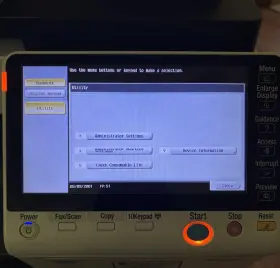
( Brand: Konica Minolta ), ( Manufacturer Part Number: A61FM70103 ), ( Compatible Brand: For Konica Minolta ), ( Type: Control Panel ), ( Compatible Series: Bizhub ), ( Compatible Model: 224e, 284e, 364e, 454e, 554e, A61dm70601 )
Review KONICA MINOLTA Control Panel Screen Display Assembly Bizhub
The Konica Minolta A61Fm series, including the Bizhub 284e, 364e, 454e, and 554e models, feature advanced control panel screens with high-resolution displays for enhanced user experience and improved productivity.
The control panel screen on these Konica Minolta multifunction printers (MFPs) boasts a 7-inch, high-definition, touch-sensitive display. This large, vibrant screen allows users to easily navigate through various functions and settings with the touch of a finger. The high resolution ensures that text and graphics appear crisp and clear, making it easier to read and operate the machine.
Additionally, the control panel interface is intuitive and user-friendly, enabling users to quickly access essential features and perform common tasks. The screen also provides real-time information about the printer's status, such as toner levels, paper trays, and network connection.
The control panel screen on the Konica Minolta A61Fm series is designed to be energy efficient and features an automatic backlight adjustment function. This function helps to save energy by adjusting the screen brightness based on the ambient light in the room. The screen also has a power-saving mode that turns off the display when the machine is in standby mode or not in use for an extended period.
In summary, the Konica Minolta A61Fm series control panel screen is a high-resolution, intuitive, and user-friendly interface that enables users to easily navigate through various functions and settings on their multifunction printer. Its large, touch-sensitive display ensures clear and crisp visuals, while its energy-saving features help to reduce power consumption.
The Konica Minolta A61Fm series of multifunction printers (MFPs), which includes the BizHub 284e, 364e, 454e, and 554e models, offers several advantages and disadvantages when considering the purchase of a replacement control panel screen display.
Advantages:1. Improved User Experience: A new control panel screen display can enhance the user experience by providing a clearer, brighter, and more responsive interface for operating the MFP. This can lead to increased productivity and efficiency in the workplace.
2. Better Image Quality: A higher-resolution display can also improve the overall image quality of the MFP's output, making text and graphics appear sharper and more detailed.
3. Compatibility with New Features: Upgrading to a newer display may allow access to new features and functionality that were not previously available, providing additional value to your investment.
Disadvantages:1. Cost: Replacing a control panel screen display can be a significant expense, especially for older models. The cost of a new display may be comparable to the price of a newer MFP, making it a consideration for organizations with limited budgets.
2. Potential Compatibility Issues: There is a risk that the new display may not be fully compatible with older MFP models, potentially leading to compatibility issues or the need for additional hardware or software upgrades.
3. Installation Complexity: Installing a new control panel screen display can be a complex process, requiring technical expertise and potential downtime for the MFP during installation.
Ending Conclusion:The decision to purchase a new control panel screen display for a Konica Minolta A61Fm MFP depends on several factors, including the current condition and age of the existing display, the budget for the upgrade, and the potential benefits and drawbacks of the new display. Organizations that prioritize user experience, image quality, and access to new features may find the investment worthwhile. However, those with limited budgets or concerns over compatibility and installation complexity may want to consider alternative options, such as repairing the existing display or upgrading to a newer MFP model.
Recommendation:Before making a decision, it's recommended to evaluate the specific needs of your organization and the potential costs and benefits of a new control panel screen display. Consulting with a Konica Minolta dealer or authorized service provider can provide valuable insights into the compatibility and installation process, as well as alternative options for upgrading your MFP. Additionally, considering the total cost of ownership, including the potential savings from increased productivity and efficiency, can help determine if the investment in a new display is worthwhile.
Details:
Removed from a fully functioning printer. Fully Tested and in fine working order. Minor signs of wear as pictured. Konica Minolta Control Panel Screen Display Assembly, A61FM70103 A61DM70601, for Bizhub 224e.
part #: a61fm70103 prices
- $99.99-$229.97
specifications prinopower:
- brand: Konica Minolta
- mpn: A61fm70103
- compatible brand: For Konica Minolta
- type: Control Panel
- compatible series: Bizhub
- compatible model: 224e, 284e, 364e, 454e, 554e, A61dm70601
offer prinopower:
- started: November 8, 2025
- quantity: 1
- options: Ship-to-home
- sold: 0
- availability: In Stock
seller prinopower:
- city: Hudson, Florida
- rating: 99.1%
- # reviews: 860
payments prinopower:
- other
- wallet: Paypal
- credit card: Visa
returns prinopower:
- policy: No Returns
shipping prinopower:
- class: Standard, Expedited
- cost: $17.05
- transit: 5-10 Days
- service: USPS Ground Advantage, USPS Priority Mail, UPS Ground, FedEx Ground / FedEx Home Delivery
- type: Calculated
- carrier: USPS, UPS, FedEx
general prinopower:
- condition: Used
- Printers, Scanners Supplies > Printer Scanner Parts Accs > Power Supplies
Konica Minolta A61FM70103 Is Similar To:
- Konica Minolta A61fr70000 Power Supply Board Assembly For Bizhub 224e 284e 364e (66.3% similar) Not compatible with color c series C224E, C284E, and C364E need model A5C1R70500. Konica Minolta A61FR70000 Sony A61FM400 power supply board assembly see photos, your unit should match 100-124V not compatible with 220-240V printer model's , for bizhub 224E...(November 7th, 2025)
- Konica Minolta A61fh00101 Main Logic Formatter Board Assembly Set Bizhub 224e 284e 364e (61% similar) Konica Minolta A61FH00101 A61FH02001, wpm assembly Pb-Cl Pb Pb-MP matched set also includes 2GB memory stick and Pb-sad solid state HDD driver board no included, for bizhub 224E. Not compatible with color c series: C224E, C284E, and C364E for bizhub...(November 7th, 2025)
- Konica Minolta A61fr72100 Ccd Lens Assembly Scanner Bulb Bizhub 364e 454e 554e (70.2% similar) Konica Minolta CDC lens assembly A61FR721 for bizhub 224E. Not compatible with color c series: C224E, C284E, C364E, C545E, 554E 554E...(November 7th, 2025)
- Konica Minolta A1udr71700 Ccd Lens Assembly Scanner Bulb Bizhub 223 283 363 423 (59.2% similar) Not compatible with color c series: C223, C283, C363, C423 for bizhub. Konica Minolta CDC lens assembly A1UDR717 for bizhub 223...(November 13th, 2025)
- Konica Minolta A1udh02102 Main Logic Formatter Board Assembly Set Bizhub 363 423 Pwb (55.2% similar) Konica Minolta, A1UDH02102 A1UDP00004, wpm assembly Pb-MC Pb Pb-MP matched set, no memory or HDD included, for bizhub 363. Only compatible with the above two model's for bizhub...(November 13th, 2025)
- Konica Minolta A1udm40102 Power Supply Board Assembly For Bizhub 223 283 363 423 (62.4% similar) Not compatible with color c series if your printer model starts with a c, this power supply will work for you. Konica Minolta, A1UDM401/A1UDM40102 Nichiren ZSMQ906M power supply board assembly see photos, your unit should match 110-127V not compatible with 220-240V printer model's , for...(November 13th, 2025)
- Konica Minolta A0p0m70603 Control Panel Screen Display Assembly Bizhub 223 283 363 423 552 (85.6% similar) Removed from a fully functioning printer. Konica Minolta control panel screen display assembly, A0P0M70603 A0P0M70601 , for bizhub 223. Fully tested and in fine working order. Minor signs of wear as pictured...(November 13th, 2025)